Talking-head Reels, five a week
Batch the week's clips on Sunday, pick one style for all of them, export. Your name and programme names stay spelled right thanks to the dictionary.
Word-by-word highlight captions for Reels, Shorts and TikTok. Offline Captions transcribes on your laptop, so there are no uploads, no credits and no monthly bill.
Founding price. $39 after launch. One payment, no subscription.
A real recording of the app: drop in a video with no subtitles, the captions are made on your computer, then export it ready to post. Tap for sound to check the words land on the lips.
These clips came straight out of our caption engine with no hand edits: a 17-second public-domain NASA clip, transcribed offline and rendered in each style. Switch styles to see the difference.
Reveal: words appear as they're spoken, with a green highlight.
What the engine heard (English, offline):
"We talk to each other by establishing a radio link between the ISS and your school as we fly over your location. We won't have a lot of time to talk because we'll be cruising over the ground station at 17,500 miles an hour. That's 25 times the speed of sound. So we'll actually only have about nine or ten minutes of good radio contact from the horizon to the horizon."
The three yellow words are ones the model flagged as unsure. They were right this time; the app asks you to glance at them instead of proofreading everything. Clips are muted here.
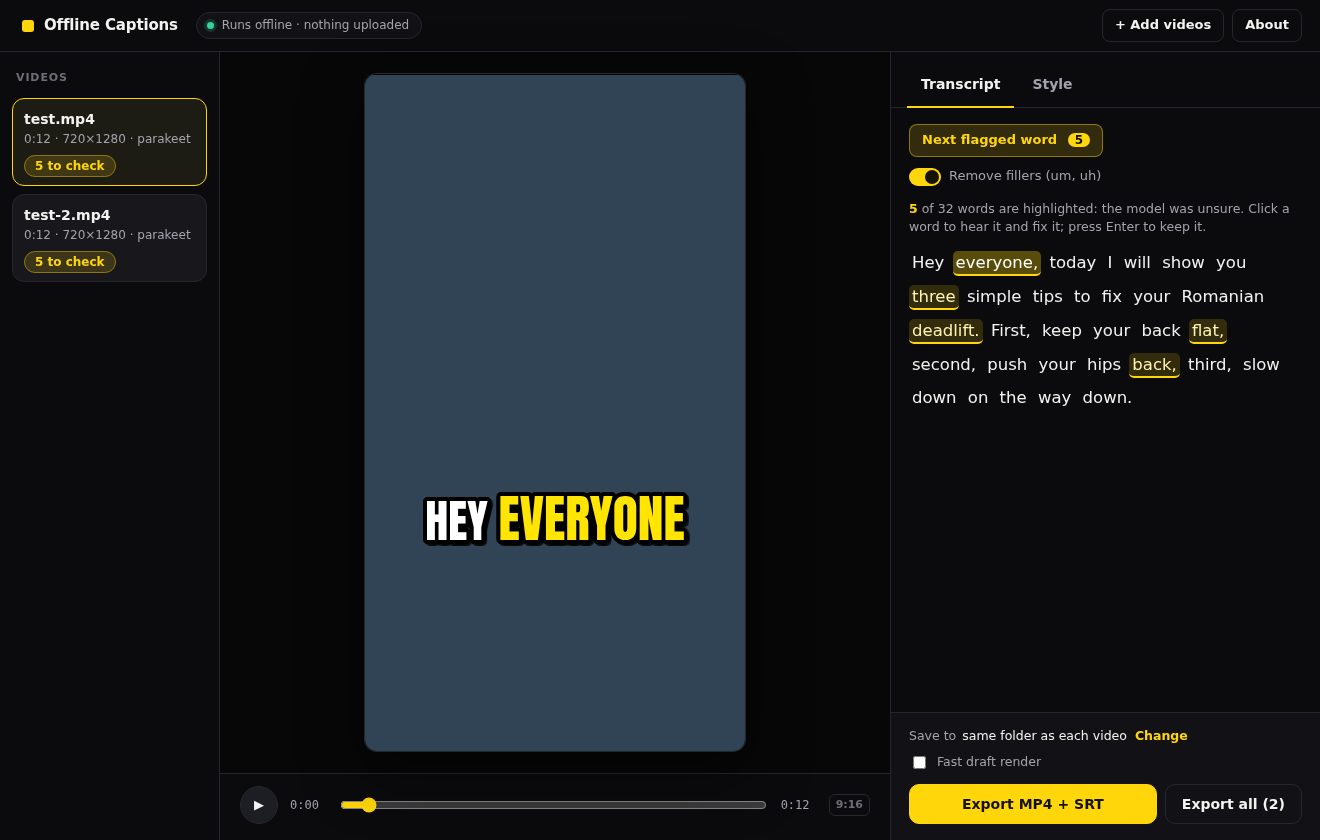
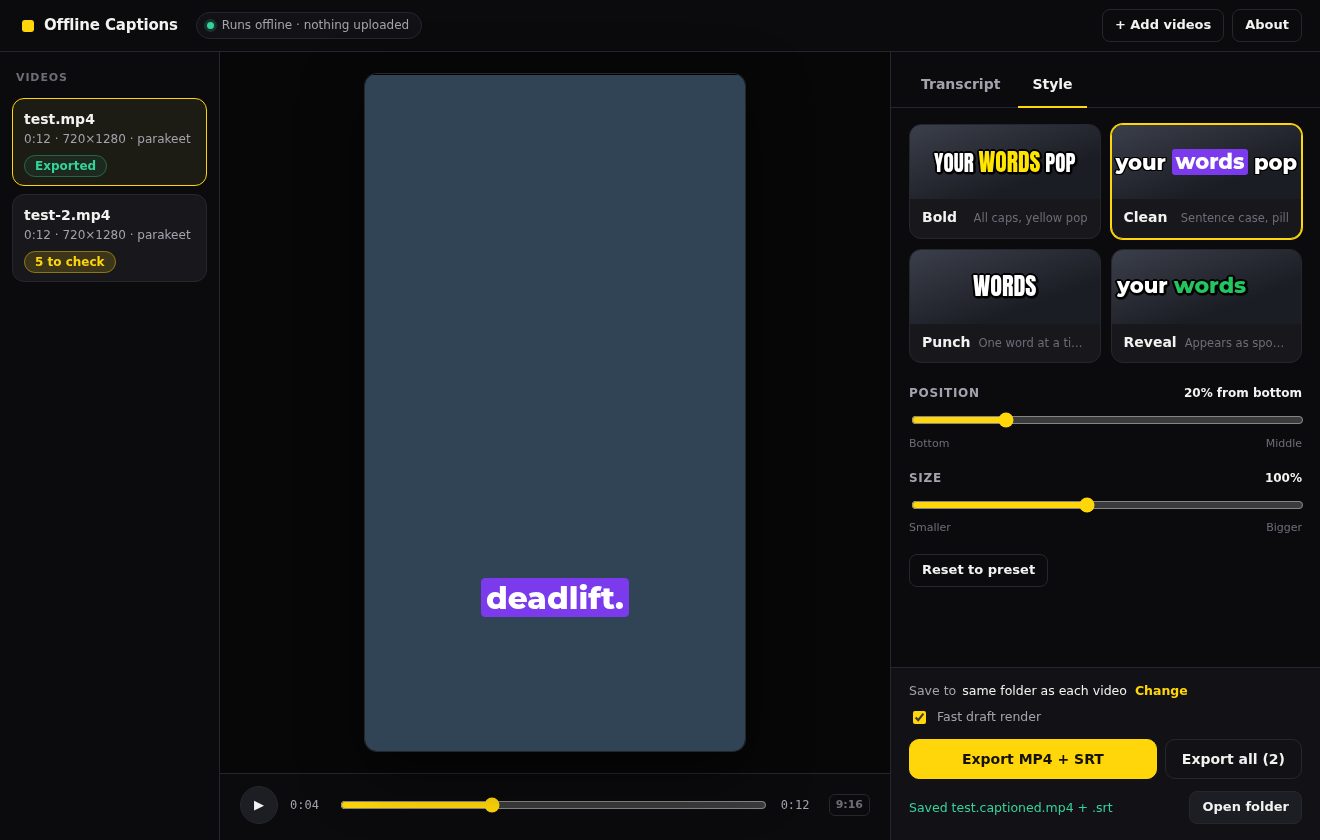
Screenshots from a pre-release build of the desktop app; details may change before launch.
One clip or a whole folder. Everything stays on your computer.
It transcribes locally and marks any word it isn't sure about in yellow. Fix those, skip the rest.
Bold, clean, punch or reveal. You get the captioned MP4 at your video's own resolution, plus an .srt file.
Correct a name or brand word once and it's remembered for every video after.
Drops "um" and "uh" from your captions with one switch.
Caption a week of clips in one go. No credits to count.
Each word is timed to the audio, so the highlight moves with your voice.
Hindi-English speech written in Roman script, the way your audience types it. More
No account needed to caption, no upload queue, nothing to stop working when the Wi-Fi does.
If you caption every video you post, a per-video credit or a monthly fee is a tax on consistency. That's who this is built for.
Typical people: coaches and consultants, educators, podcasters clipping their episodes, UGC creators.
Hindi and Hinglish creators. Roman-script Hinglish captions, timed word by word, offline. See the Hinglish page →
Probably not forBatch the week's clips on Sunday, pick one style for all of them, export. Your name and programme names stay spelled right thanks to the dictionary.
Cut 8–10 moments from an episode, drop the folder in, and caption them all in one run. Guests' names go in the dictionary once.
Burn captions into the promo Shorts and keep the .srt for the full lessons on your course platform or YouTube.
Unreleased product launches, NDA client footage, clinic or therapy promos: transcription never leaves your machine.
"Usko gaali de do, complaint kar lo" comes out in Roman script, timed word by word, ready for Reels. Hinglish page
The same four styles for both: English and Hinglish each have their own engine. Hindi in Devanagari and more Indian languages are coming.
The others do far more than captions. If captions are the job, here's how price, limits and privacy line up. Read side by side: vs CapCut · vs Submagic.
| Feature | Offline Captions | CapCut Pro | Submagic | AutoSubtitles | Descript Hobbyist |
|---|---|---|---|---|---|
| Price | $39 once $29 founding pre-order | $19.99/mo or $179.99/yr | $12–$41/mo billed yearly, $19–$69 monthly | Free with watermark; Pro $9/mo | $16/mo billed yearly, $24 monthly |
| How you pay | One-time purchase | Subscription | Subscription + credits | Subscription | Subscription |
| Auto captions | Included | Pro only (not in free) | All plans | All plans | All plans ("dynamic captions") |
| How many videos | Unlimited | No cap listed; AI features use 1,200 AI points/month | 15, 40 or 100 videos/month by plan | Not listed | 10 media hours/month |
| Max video length | No cap | Not listed | 2, 5 or 30 min by plan | 30 min on Pro | Not listed |
| Where speech is transcribed | On your computer, offline | Not listed | Their servers (web app) | Audio sent to their AI service; video stays in browser | Descript's cloud |
| Custom word dictionary | Yes, learns from your fixes | Not listed | Business plan only | Not listed | Business plan only |
| Filler-word removal | Yes | Not listed | Pro and Business | Not listed | Yes |
| SRT export | Yes | Not listed | Not listed | Pro | Not listed |
| Export resolution | Your video's own resolution | Up to 8K | 1080p; 2K Pro; 4K Business | 720p free; Pro not listed | 1080p (4K on Creator) |
Swipe the table sideways to see every tool →
Checked October 2026 on each company's own pages: CapCut Standard vs Pro, CapCut pricing change, Submagic pricing, AutoSubtitles, Descript pricing. US-dollar list prices; your price can differ by country, platform, tax and promotion. "Not listed" means we couldn't find it on the vendor's public pages, not that it's missing. All names are trademarks of their owners; we're not affiliated with any of them.
$29 once
$39 after launch.
Cheapest way to pay for a year on each plan that includes auto captions.
Year two costs the same again on every subscription. Submagic Starter also caps you at 15 videos a month and 2 minutes each; Submagic Pro is $276 a year. List prices checked October 2026, sources in the table above. At the $39 regular price the first bar would read $39.
If you want CapCut-style animated, word-by-word captions without a subscription or uploading your videos, Offline Captions is built for exactly that. It transcribes on your own Mac or Windows PC, works with no internet connection, and costs $39 once ($29 as a founding pre-order). CapCut Pro costs $19.99 a month or $179.99 a year and CapCut says its auto caption generator is exclusive to Pro (checked Oct 2026). CapCut is a full video editor, so if you need its effects and templates it can still be the better fit. Full comparison.
Yes. Offline Captions is a one-time purchase: $39 after launch, $29 for founding pre-orders. There is no subscription, no credits and no watermark, and there is no limit on how many videos you caption, because the work happens on your computer instead of a paid server.
Choose Hinglish mode, drop in your video and export. Offline Captions writes Hindi-English speech in Roman script, the way people type it (for example "Usko gaali de do, complaint kar lo"), with each word timed for the highlight animation. It runs offline on your computer. Words it could not time precisely are marked in yellow so you can check them. Hinglish details.
No. Transcription and rendering happen on your computer. Your video and audio never leave your machine, and the app works offline once it and its speech model are installed.
On our own 28-clip benchmark of noisy, accented English, the English engine had a 7.6% word error rate, versus 9.6% for the widely used open alternative. We have not finished a head-to-head test against CapCut or Submagic, so we don't claim to beat them. Words the model is unsure of are highlighted in yellow and a personal dictionary remembers your names and brand words.
Mac and Windows. Exact minimum specs will be published before launch. Transcription runs on your own hardware, so newer computers finish faster.
Yes. Every export gives you the captioned MP4 with the animation burned in, plus a standard .srt file for YouTube, LinkedIn or your video editor.
No. YouTube's Terms of Service don't allow downloading videos outside YouTube's own features, so the app won't fetch YouTube links. Captions get burned in before you post, so you'll already have the original file, and it's better quality than a re-download too. If your own files are in the cloud, paste a Google Drive or Dropbox link in the desktop app. For a video that's already on YouTube, export an .srt file and upload it in YouTube Studio under Subtitles; there's no need to re-upload the video.
Yes. Drop in a folder of clips, pick your style, and it captions them one after another while you do something else. There is no per-video charge.
English is the main focus. Hinglish has its own mode with Roman-script output. Hindi in Devanagari and other Indian languages are coming; we'll say which ones when they're ready.
You're covered by a -day money-back guarantee. Email us and we'll refund you.
Not yet. Shorts Studio is a planned add-on that turns a long video or podcast into ready Shorts on your own computer: it cuts silences and retakes, shortlists 8–15 clips for you to pick from, crops to vertical around whoever is speaking, and keeps your captions in sync. The planned price is $79 once with captions included, or a $40 upgrade for Offline Captions owners. It isn't for sale and nothing ships today. Join the Shorts Studio waitlist and we'll email you once if we build it.
Lock in the founding price of $29. One payment, unlimited videos.
Not ready to pay? Get one email when it launches.
You're on the list. We'll email you once.
No spam. One launch email, then you decide.